Creating Equity Tokens
Learn how to create equity tokens representing company shares using the ATS web application.
Overview
Equity tokens represent ownership shares in a company. They can include features like:
- Dividend distributions to shareholders
- Voting rights for governance
- Transfer restrictions and compliance rules
- Lock-up periods for insider shares
Prerequisites
- ATS web application running and accessible
- Hedera wallet connected (HashPack, Blade, or MetaMask)
- Sufficient HBAR for transaction fees
- Business Logic Resolver and Factory contracts deployed
Getting Started
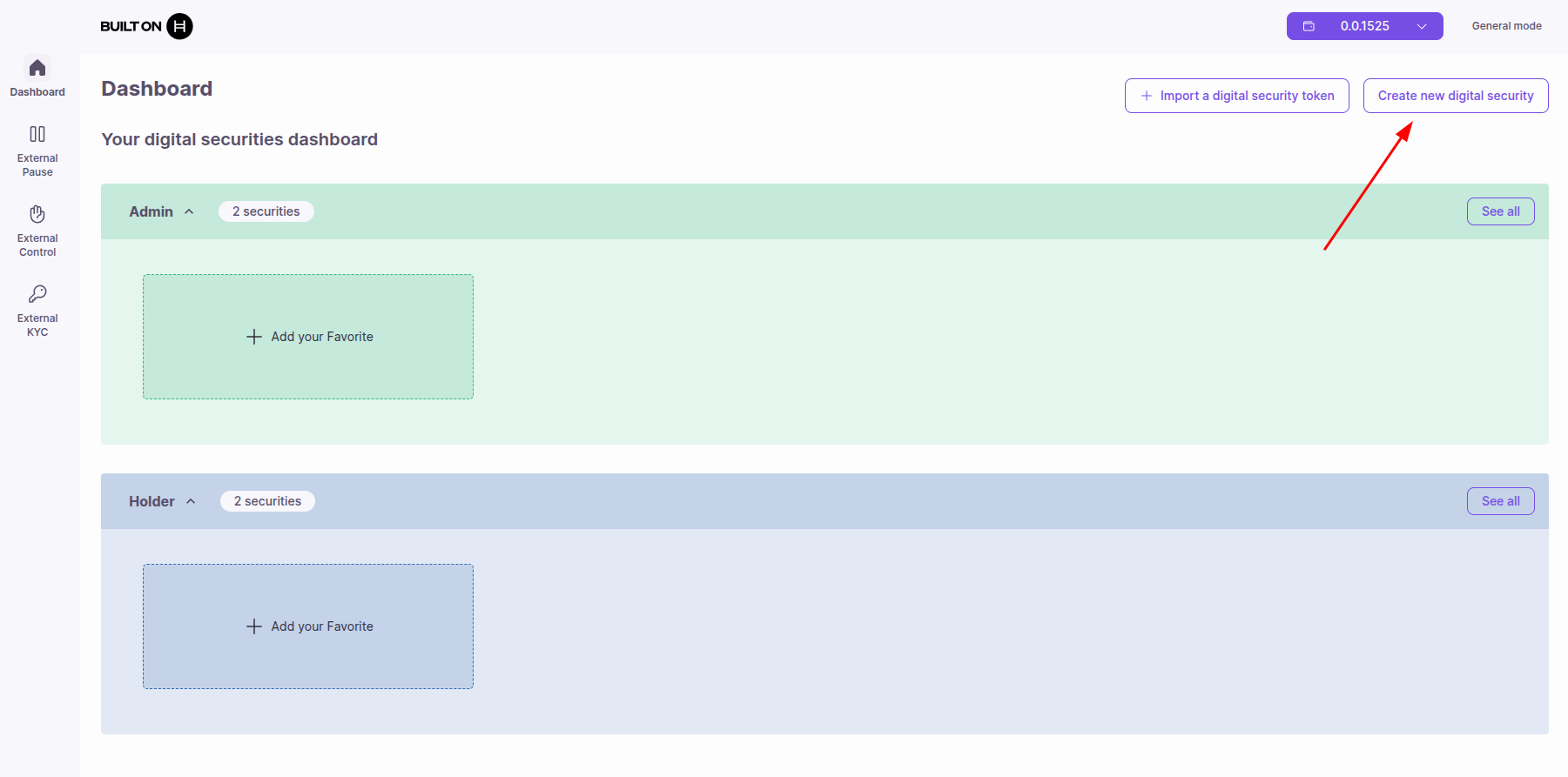
- Open the ATS web application
- Click "Create Token" in the navigation menu
- Select "Equity" as the token type
Step 1: General Information
Token Details
Token Name: The full name of your security
- Example: "Acme Corporation Common Stock"
Token Symbol: A short ticker symbol (2-5 characters)
- Example: "ACME"
Total Supply: The number of shares to issue
- Example: 1,000,000 shares
Decimals: Number of decimal places (usually 0 for equity)
- Recommended: 0 (whole shares only)
ISIN: International Securities Identification Number
- Format: 2-letter country code + 9 alphanumeric characters + 1 check digit
- Example:
US9311421039 - Must follow the ISO 6166 standard format
Digital Security Permissions
Configure administrative permissions for the token:
Controllable
- Purpose: Enable forced transfers and balance adjustments
- When enabled: Grants CONTROLLER_ROLE the ability to:
- Force transfer tokens between accounts
- Adjust balances for regulatory compliance
- Execute court-ordered transfers
- Use cases: Regulatory requirements, lost key recovery, inheritance
- Recommendation: Enable only if required by regulation
Blocked Accounts List (Blacklist)
- Purpose: Block specific addresses from holding tokens
- How it works: Addresses on the list cannot receive or hold tokens
- Use cases: Sanctioned addresses, regulatory blacklists
- When to use: When you want to block specific addresses but allow everyone else
Allowed Accounts List (Whitelist)
- Purpose: Only approved addresses can hold tokens
- How it works: Only addresses on the list can receive tokens
- Use cases: Accredited investor-only offerings, private placements
- When to use: When you want to restrict token ownership to pre-approved addresses only
Important: You must choose either blacklist or whitelist, not both. They are mutually exclusive options.
Digital Security Configuration
Clearing Mode
- Purpose: Require validator approval for all transfers and redeems
- What it does:
- Users must submit transfer/redeem requests
- Validators (CLEARING_VALIDATOR_ROLE) must approve before execution
- Enables regulatory oversight of all token movements
- When to enable:
- Regulatory compliance requires approval workflow
- Jurisdiction-specific rules need validation
- Manual review required for transfers
- Roles activated: CLEARING_ROLE, CLEARING_VALIDATOR_ROLE
Learn more: See Clearing Operations for complete guide on using clearing mode.
Internal KYC
- Purpose: Enable/disable internal KYC verification
- Flag:
internalKYCActivated - When enabled: Token checks internal KYC registry for transfers
- When disabled: Only external KYC lists and SSI are checked
- Use cases:
- Enable: Use token's own KYC database
- Disable: Rely entirely on external KYC providers
Tip: You can use Internal KYC + External KYC Lists + SSI simultaneously. Any method granting KYC allows the transfer.
Step 2: Equity-Specific Details
Financial Information
Nominal Value (Par Value)
- Definition: Face value of each share
- Example: $1.00 per share
- Use: Accounting and legal compliance
- Note: Can differ from market price
Currency
- Value: USD (US Dollar)
- Purpose: Currency for nominal value and dividends
- Note: Currently fixed to USD, cannot be changed
Number of Shares
- Definition: Same as Total Supply (from Step 1)
- Example: 1,000,000 shares
- Calculation: Number of Shares × Nominal Value = Total Value
Total Value
- Calculation: Automatically computed
- Formula: Number of Shares × Nominal Value
- Example: 1,000,000 shares × $1.00 = $1,000,000 total value
Rights and Privileges
Configure shareholder rights (metadata stored on-chain):
Voting Right
- Purpose: Right to vote on corporate decisions
- When true: Shareholders can participate in governance votes
- Use cases: Board elections, major transactions
Information Right
- Purpose: Right to receive financial information
- When true: Shareholders entitled to financial reports
- Use cases: Annual reports, quarterly statements
Liquidation Rights
- Purpose: Priority in case of company liquidation
- When true: Shareholders have claims on remaining assets
- Priority: Typically after creditors, before common shareholders
Conversion Rights
- Purpose: Right to convert to another security type
- When true: Shares can be converted (e.g., preferred to common)
- Use cases: Convertible preferred stock
Submission Rights
- Purpose: Right to submit proposals for shareholder vote
- When true: Shareholders can propose resolutions
- Use cases: Shareholder activism, governance proposals
Redemption Rights
- Purpose: Right for company to buy back shares
- When true: Company can redeem shares at specified price/time
- Use cases: Preferred stock redemption, buyback programs
Put Right
- Purpose: Right for shareholder to sell back to company
- When true: Shareholder can force company to buy shares
- Use cases: Liquidity events, exit provisions
Note: These are metadata flags. Actual enforcement may require additional legal/contractual agreements.
Dividend Type
Select the dividend structure for your equity token:
None
- Meaning: Shareholders will not receive dividends
- Characteristics:
- No dividend distributions
- All profits retained by company
- Use cases:
- Growth stocks focused on capital appreciation
- Early-stage companies reinvesting all profits
- Non-dividend paying equity classes
Common
- Meaning: Common stock dividends
- Characteristics:
- Variable dividend amount
- Paid after preferred shareholders
- Voting rights typically included
- Use cases:
- Standard equity ownership
- Traditional common stock
Preferred
- Meaning: Preferred stock dividends
- Characteristics:
- Fixed dividend rate or amount
- Priority over common stock holders
- May have limited/no voting rights
- Use cases:
- Investors seeking stable income
- Preferred equity classes
Step 3: External Lists Configuration
In this step, you can link previously created external lists to your token. These are optional but recommended for multi-token issuers.
External Pause Lists
External pause contracts allow coordinated pausing across multiple tokens:
- What are they: On-chain smart contracts that can pause all linked tokens
- Where to configure: Sidebar menu → External Pause
- Use cases: Platform-wide emergency stops, coordinated upgrades
- How it works: If any linked pause contract returns
isPaused() = true, token is paused - Link: Managing External Pause Lists
How to link:
- Select from dropdown: All your created pause contracts appear
- Add to token: Click to link pause mechanism
- View linked: See all currently linked pause contracts
- Remove: Unlink if no longer needed
External Control Lists
External control lists are reusable whitelists/blacklists shared across multiple tokens:
- What are they: On-chain smart contracts managing approved/blocked addresses
- Where to configure: Sidebar menu → Control Lists
- Use cases: Shared regulatory blacklists, multi-token whitelists
- Link: Managing External Control Lists
How to link:
- Select from dropdown: All your created control lists appear
- Add to token: Click to link whitelist or blacklist
- View linked: See all currently linked control lists
- Remove: Unlink if no longer needed
External KYC Lists
External KYC lists verify investor identity across multiple tokens:
- What are they: On-chain smart contracts managing KYC-verified investors
- Where to configure: Sidebar menu → External KYC
- Use cases: Shared investor verification, third-party KYC providers
- Link: Managing External KYC Lists
How to link:
- Select from dropdown: All your created KYC lists appear
- Add to token: Click to link KYC verification list
- View linked: See all currently linked KYC lists
- Remove: Unlink if no longer needed
Tip: You can create external lists from the sidebar before or after token creation.
Step 4: ERC-3643 Integration (Optional)
For advanced compliance features, integrate ERC-3643 (T-REX) contracts. This step is optional but provides enhanced regulatory compliance capabilities.
Note: Securities created by ATS are already compatible with ERC-3643 operations by default. ATS implements partial ERC-3643 (T-REX) compliance as part of its core architecture. This integration step is only required if you need full ERC-3643 standard compatibility with advanced T-REX features like custom Compliance Modules and Identity Registries. See Developer Guide: ATS Contracts for architecture details.
Compliance Module
Purpose: Enforces transfer rules and regulatory requirements
- What it does: Validates all token transfers against compliance rules
- Use cases: Complex regulatory requirements, multi-jurisdiction offerings
- Configuration: Requires deploying a Compliance Module contract
Identity Registry
Purpose: Manages verified investor identities
- What it does: Maintains on-chain registry of verified investor identities
- Use cases: Enhanced KYC management, investor identity verification
- Configuration: Requires deploying an Identity Registry contract
Important: Both Compliance Module and Identity Registry must be deployed before token creation. See Deployment Guide for instructions.
When to Use ERC-3643
Use this step only if you need full compatibility with the ERC-3643 standard:
- Standard compliance: Need to ensure full compatibility with ERC-3643 (T-REX) specification
- Interoperability: Token must work with other ERC-3643 compliant systems
- Third-party integrations: Integration with platforms that require ERC-3643 compliance
- Ecosystem compatibility: Participating in ERC-3643 token ecosystems
When to Skip
- Most use cases: ATS already provides partial ERC-3643 compliance for typical security token operations
- Custom compliance: If you just need complex compliance, use ATS's built-in features (Internal KYC, External KYC Lists, Control Lists, Clearing Mode, etc.)
- Testing/Development: Prototyping token economics without standard requirements
Step 5: Regulation
Important: Consult your legal and financial advisor for regulations applicable to your asset token.
Jurisdiction
The primary jurisdiction for your offering:
- United States
Select Regulation
Choose the regulatory framework for your token offering:
Regulation S
Purpose: Offerings outside the United States to non-U.S. persons
Restrictions and Rules:
| Rule | Details |
|---|---|
| Deal size | Can raise unlimited capital |
| Accredited investors | Accreditation required |
| Max non-accredited investors | Unlimited |
| Manual investor verification | Verification of investors' financial documents required |
| International investors | Allowed |
| Resale hold period | Not applicable |
Use cases:
- International offerings
- Non-U.S. investor base
- Global token distribution
Regulation D 506(b)
Purpose: Private placement in the United States
Restrictions and Rules:
| Rule | Details |
|---|---|
| Deal size | Can raise unlimited capital |
| Accredited investors | Accreditation required |
| Max non-accredited investors | 35 maximum |
| Manual investor verification | Verification of investors' financial documents required |
| International investors | Not allowed |
| Resale hold period | Applicable from 6 months to 1 year |
Use cases:
- U.S.-based private placements
- Accredited investor offerings
- Limited non-accredited participation
Warning: Read the restrictions carefully. These details cannot be altered once the token is deployed.
Geographic Block List
Purpose: Specify countries whose residents cannot invest
How it works:
- Based on selected regulation
- Can add additional blocked countries
- Enforced via compliance checks during transfers
Example: Block sanctioned countries or those with conflicting regulations
Step 6: Review and Deploy
Review Configuration
Before deploying, verify all configuration details:
- Token details: Name, symbol, supply, ISIN
- Permissions: Controllable, blacklist, whitelist settings
- Configuration: Clearing mode, internal KYC status
- Equity details: Nominal value, currency, rights, dividend type
- External lists: Correct lists linked (if any)
- ERC-3643: Compliance Module and Identity Registry addresses (if used)
- Regulation: Proper regulation selected, block list configured
Deployment Cost
- View estimated HBAR cost for deployment
- Includes: Factory contract call, proxy deployment, initial configuration
- Typical cost: 50-200 HBAR (varies by network congestion)
Deploy Token
- Click "Deploy Token" button
- Approve transaction in your wallet
- Wait for confirmation (typically 3-5 seconds on Hedera)
- Contract address will be displayed on success
Verify Deployment
After successful deployment:
Token Information
- Contract Address: EVM address of deployed token (0x...)
- Contract ID: Hedera contract ID (0.0.xxxxx)
- Factory: Factory contract that deployed the token
- Deployment Time: Timestamp of deployment
View in Dashboard
- Token appears in your "My Tokens" list
- Click to view token details
- Available tabs (based on your role):
- Overview: Token info, supply, holders
- Holders: List of token holders and balances
- Transfers: Transfer history
- Corporate Actions: Dividend management
- Compliance: KYC, control lists
- Settings: Token configuration
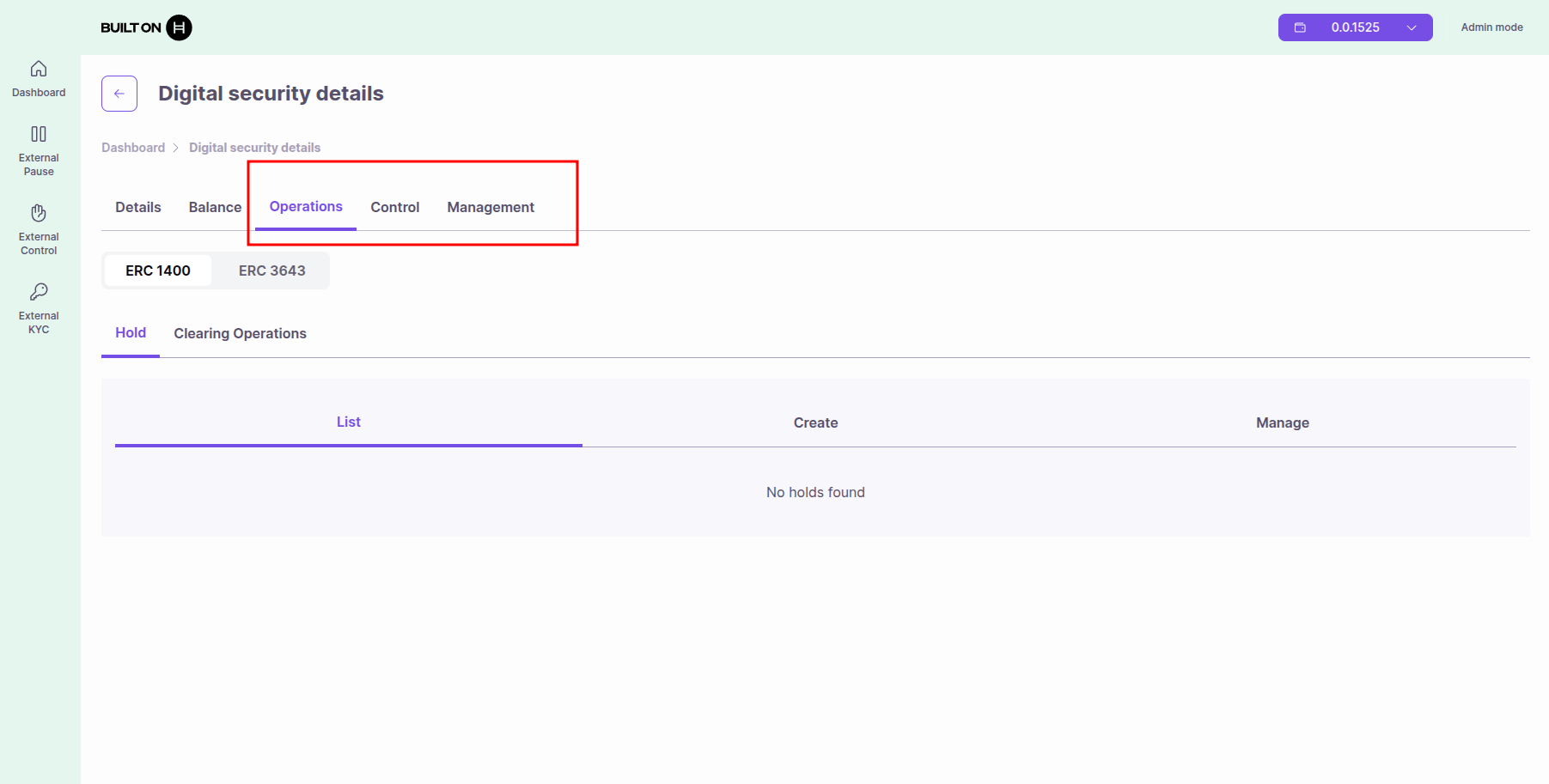
Note: Available tabs depend on your assigned roles. See Roles and Permissions.
Managing Your Equity Token
After creation, you can manage your token from the dashboard. Select Admin View (green) to access administrative operations or Holder View (blue) to view balances and transfer tokens.
Common administrative operations:
Distribute Shares
- How: Transfer tab or issue function
- Requirements: ISSUER_ROLE
- Recipients: Must pass KYC and control list checks
Execute Dividends
- How: Corporate Actions tab
- Requirements: CORPORATE_ACTION_ROLE
- Process: Create snapshot → Specify amount → Execute distribution
Manage Compliance
- KYC: Grant/revoke KYC status
- Control Lists: Add/remove addresses from whitelist/blacklist
- Freeze: Freeze specific accounts if needed
Pause Transfers
- How: Settings → Emergency pause
- Requirements: PAUSER_ROLE
- Effect: All transfers blocked until unpause
Common Issues
Transaction Failed
- Insufficient HBAR: Ensure wallet has enough HBAR for gas fees (check estimated cost)
- Invalid Configuration: Verify all required fields are filled correctly
- Contract Not Found: Check Factory contract address in your .env configuration
KYC Errors
- KYC check fails: Verify investor is KYC-verified (internal, external, or SSI)
- External list not found: Ensure external KYC list address is correct
- SSI not configured: If using SSI, verify revocation registry and issuers are set
Transfer Restrictions
- Blacklist blocking: Check if recipient is on blacklist (internal or external)
- Whitelist missing: If whitelist enabled, ensure recipient is whitelisted
- Regulation block: Verify recipient's jurisdiction is not blocked
Control List Issues
- Internal vs External: Remember both internal and external lists are checked
- Wrong list type: Verify you're using control lists (not KYC lists) for transfer control
Next Steps
- Token Operations - Learn about all available operations for your token
- Corporate Actions - Distribute dividends and manage splits/voting
- Managing KYC & Compliance - Set up investor verification
- Roles and Permissions - Grant roles to team members
- SSI Integration - Decentralized identity verification with Terminal 3
- Managing External KYC Lists - Configure external verification
- Managing External Control Lists - Configure transfer restrictions